

What Is a Label Printer and How Do You Choose the Best One?
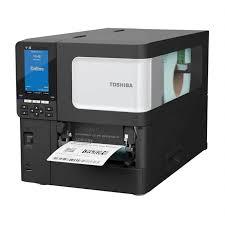
In today's competitive business environment, accurate product labeling and efficient packaging are essential for success. From retail stores and warehouses to manufacturing companies and online businesses, organizations use labels to identify products, manage inventory, display prices, and organize shipments. A label printer makes these tasks faster, easier, and more professional.
Whether you run a small business, operate an e-commerce store, or manage a large warehouse, choosing the right label printer can improve productivity and reduce manual work. These printers are available in different sizes and technologies, including thermal, direct thermal, thermal transfer, and inkjet models.
In this blog, we will explain what a label printer is, how it works, its different types, major benefits, and the factors you should consider before purchasing one. We will also answer frequently asked questions to help you make the right decision.
What Is a Label Printer?
A Label Printer is a specialized printing device designed to print information on adhesive labels, stickers, tags, and other labeling materials. Depending on the model, it can print product names, barcodes, QR codes, prices, shipping addresses, logos, and other business information.
Unlike ordinary office printers, many label printers are designed to handle rolls or sheets of label material. They can produce labels in different sizes according to business requirements.
Label printers are commonly used in retail stores, supermarkets, pharmacies, warehouses, factories, logistics companies, and online shopping businesses. They help businesses organize products, identify inventory, and maintain consistent labeling.
How Does a Label Printer Work?
A label printer works by transferring digital information onto compatible label material. The printing process depends on the technology used.
Thermal printers use heat to create text, barcodes, or images. Direct thermal printers print on specially coated labels, while thermal transfer printers use a heated ribbon to transfer ink onto the label.
Inkjet label printers spray tiny droplets of ink onto the printing surface, making them useful for colorful product labels and detailed graphics.
The general printing process includes these steps:
- Design the label: Create a label using compatible software or a label-design application.
- Connect the printer: Connect it to a computer, POS system, or compatible mobile device.
- Load the material: Insert the appropriate label roll or sheets.
- Configure the settings: Select the label size, print quality, and other required settings.
- Print the label: Send the design to the printer and apply the finished label to the product or package.
What Are the Different Types of Label Printers?
Choosing the right label printer starts with understanding the main technologies available.
1. Direct Thermal Label Printer
A direct thermal label printer uses heat-sensitive label material to create printed information without conventional ink cartridges or toner.
These printers are commonly used for shipping labels, receipts, delivery labels, and short-term product identification.
Benefits:
- Simple operation.
- No ink or thermal transfer ribbon required.
- Convenient for frequent label printing.
- Suitable for many shipping and logistics applications.
However, direct thermal labels may fade or darken when exposed to heat, sunlight, or friction. They are generally less suitable for applications requiring long-term durability.
2. Thermal Transfer Label Printer
A thermal transfer label printer uses heat to transfer ink from a ribbon onto a compatible label surface.
This technology can produce durable labels and supports various materials, including suitable paper and synthetic labels. It is often used for asset tracking, manufacturing, inventory management, and product identification.
Benefits:
- Suitable for many long-lasting labels.
- Supports different label materials.
- Produces clear text and barcodes.
- Useful for demanding business applications.
The main consideration is the additional cost of ribbons and the need to match the ribbon to the label material.
3. Inkjet Label Printer
An inkjet label printer uses liquid ink to print text, graphics, logos, and colorful designs on compatible labels.
These printers are useful for businesses that need attractive product packaging, branded stickers, or detailed color labels.
They may be suitable for cosmetics, food packaging, handmade products, and specialty retail items. However, ink costs and water resistance depend on the printer, ink formulation, and label material.
4. Desktop Label Printer
Desktop label printers are compact machines designed for small and medium-sized businesses. They are often used in offices, retail stores, pharmacies, and home-based businesses.
They are convenient for limited or moderate printing volumes and generally require less space than industrial equipment.
5. Industrial Label Printer
Industrial label printers are designed for high-volume printing and demanding commercial environments.
They are commonly used in factories, distribution centers, warehouses, and logistics operations. Depending on the model, they may offer faster printing, greater media capacity, robust construction, and support for wider labels.
What Are the Benefits of Using a Label Printer?
A label printer offers several advantages for businesses of different sizes.
Faster Label Production
Businesses can print labels when needed instead of writing product information manually. This can save time during packaging, inventory management, and order fulfillment.
Improved Accuracy
Printing labels from digital records helps reduce spelling mistakes, incorrect product codes, and other manual errors.
Professional Appearance
Consistent fonts, clear text, and standardized layouts help products and packages look organized and professional.
Better Inventory Management
Barcode and QR code labels help businesses identify products, track stock movements, and organize warehouse locations when used with compatible software.
Flexible Label Sizes
Many label printers support different widths and formats, allowing businesses to print shipping labels, price tags, asset labels, and product stickers.
Potential Cost Savings
For businesses that print labels regularly, a suitable label printer can reduce repetitive manual work and improve operating efficiency. Actual savings depend on the printing technology, consumables, and workload.
How Do You Choose the Best Label Printer?
Before buying a label printer, consider the following factors.
1. Printing Requirements
Decide whether you need shipping labels, barcode labels, price tags, product stickers, or colorful packaging labels. The intended application will help determine the most suitable technology.
2. Print Volume
A small desktop printer may be sufficient for a home business or retail counter. Warehouses and factories with high daily printing volumes may require an industrial model.
3. Print Quality
Choose a suitable print resolution for your labels. Higher resolution can be useful for small text, detailed graphics, and compact barcodes.
4. Label Size and Material
Check the maximum label width, supported roll sizes, and compatible materials. Make sure the printer can handle the label dimensions required by your business.
5. Connectivity
Common connection options include USB, Ethernet, Wi-Fi, and Bluetooth. Choose a printer compatible with your computer, mobile device, POS terminal, or business software.
6. Running Costs
Consider the cost of label rolls, ribbons, ink cartridges, maintenance, and replacement parts. A printer with a low purchase price may have higher ongoing operating costs.
7. Software Compatibility
Confirm that the printer works with your label-design software, inventory management system, shipping platform, or POS application.
How Can You Maintain a Label Printer?
Regular maintenance helps maintain print quality and reduce downtime.
- Clean the printhead according to the manufacturer's instructions.
- Remove dust, adhesive residue, and label debris.
- Use compatible label rolls, ribbons, and ink.
- Inspect rollers and other accessible components for wear.
- Store label materials in a suitable environment.
- Update printer drivers or firmware when recommended.
- Follow the manufacturer's maintenance schedule.
Always switch off the printer before cleaning it and allow hot components to cool. Use approved cleaning products to avoid damaging the printhead.
A label printer is a valuable tool for businesses that need accurate, consistent, and professional labeling. From small retail shops and home-based businesses to large warehouses and manufacturing facilities, the right printer can simplify daily operations and improve product identification.
Before purchasing, consider your printing volume, label material, required durability, connectivity, software compatibility, and ongoing costs. Selecting the right label printer will help you streamline your workflow, maintain organized inventory, and create clear, professional labels for your business.
Frequently Asked Questions (FAQs)
1. What Is a Label Printer Used For?
A label printer is used to print product labels, barcode stickers, shipping labels, price tags, inventory labels, asset tags, and packaging information.
2. Which Label Printer Is Best for Small Businesses?
A compact desktop thermal printer is often suitable for shipping and barcode labels. If you need colorful product packaging, an inkjet label printer may be more appropriate.
3. Does a Label Printer Need Ink?
Not always. Direct thermal printers use heat-sensitive labels and do not require ink or a ribbon. Thermal transfer printers require ribbons, while inkjet label printers use ink cartridges or compatible ink systems.
4. Can a Label Printer Print Barcodes and QR Codes?
Yes. Many label printers can print barcodes and QR codes when the printer, label software, and resolution support the required format.
5. What Is the Difference Between a Label Printer and a Regular Printer?
A label printer is designed specifically for labels and may support rolls, adhesive materials, and specialized label formats. A regular printer is generally designed for paper documents, although some models can also print on compatible label sheets.
6. Are Thermal Label Printers Suitable for Shipping?
Yes. Thermal label printers are widely used for shipping and delivery labels because they can print clear addresses and barcodes without conventional ink or toner.
7. How Long Do Printed Labels Last?
Label durability depends on the printing technology, label material, adhesive, and environmental conditions. Direct thermal labels are often suitable for short-term use, while suitable thermal transfer materials can provide greater durability.
8. Can I Connect a Label Printer to My Computer?
Yes. Many models support USB or Ethernet connections, while selected models also offer Wi-Fi or Bluetooth. Check the manufacturer's specifications for compatibility.
9. How Do I Choose Between Direct Thermal and Thermal Transfer Printing?
Direct thermal printing is convenient for short-term labels, such as many shipping labels. Thermal transfer printing is often preferable when labels must remain readable for longer periods or withstand challenging conditions.

 English
 Arabic
 Spanish
 Portuguese
 Deutsch
 Turkish
 Dutch
Dutch
 Italiano
 Russian
 Romaian
 Portuguese (Brazil)
 Greek
Greek
